
OpenClash Installation & Setup Guide (OpenWrt Routers)
OpenClash is an open-source Clash plugin for OpenWrt routers with a LuCI web interface. Once it's running on your router, every phone, computer, and TV connected to it can use the proxy without installing a client on each device.
| Runs on | Core | License | Price |
|---|---|---|---|
| OpenWrt (LuCI 19.07 or later) | Mihomo | MIT | Free |
Download
OpenClash is published on its official GitHub releases page. Pick the package for your router's package manager:
| Package manager | File name | For |
|---|---|---|
| opkg | luci-app-openclash_*_all.ipk | Most current OpenWrt versions |
| apk | luci-app-openclash-*.apk | Newer OpenWrt versions that use the apk package manager |
which opkg apk. Whichever one prints a path is the one your system uses.Install
Install dependencies
SSH into the router and install the dependencies for your firewall type. OpenWrt 22.03 and later use nftables (Firewall4) by default; earlier versions use iptables.
opkg update
opkg install bash dnsmasq-full curl ca-bundle ip-full ruby ruby-yaml kmod-tun kmod-inet-diag unzip kmod-nft-tproxy luci-compat luci luci-base
opkg update
opkg install bash iptables dnsmasq-full curl ca-bundle ipset ip-full iptables-mod-tproxy iptables-mod-extra ruby ruby-yaml kmod-tun kmod-inet-diag unzip luci-compat luci luci-base
apk update
apk add bash dnsmasq-full curl ca-bundle ip-full ruby ruby-yaml kmod-tun kmod-inet-diag unzip kmod-nft-tproxy luci-compat luci luci-base
If you get a conflict between dnsmasq and dnsmasq-full, run opkg remove dnsmasq (or apk del dnsmasq on apk systems) first, then install the dependencies again.
Install OpenClash
From the web interface: in LuCI, open System → Software, click Upload Package, choose the package you downloaded, and install it. Refresh the page and OpenClash appears under the Services menu.
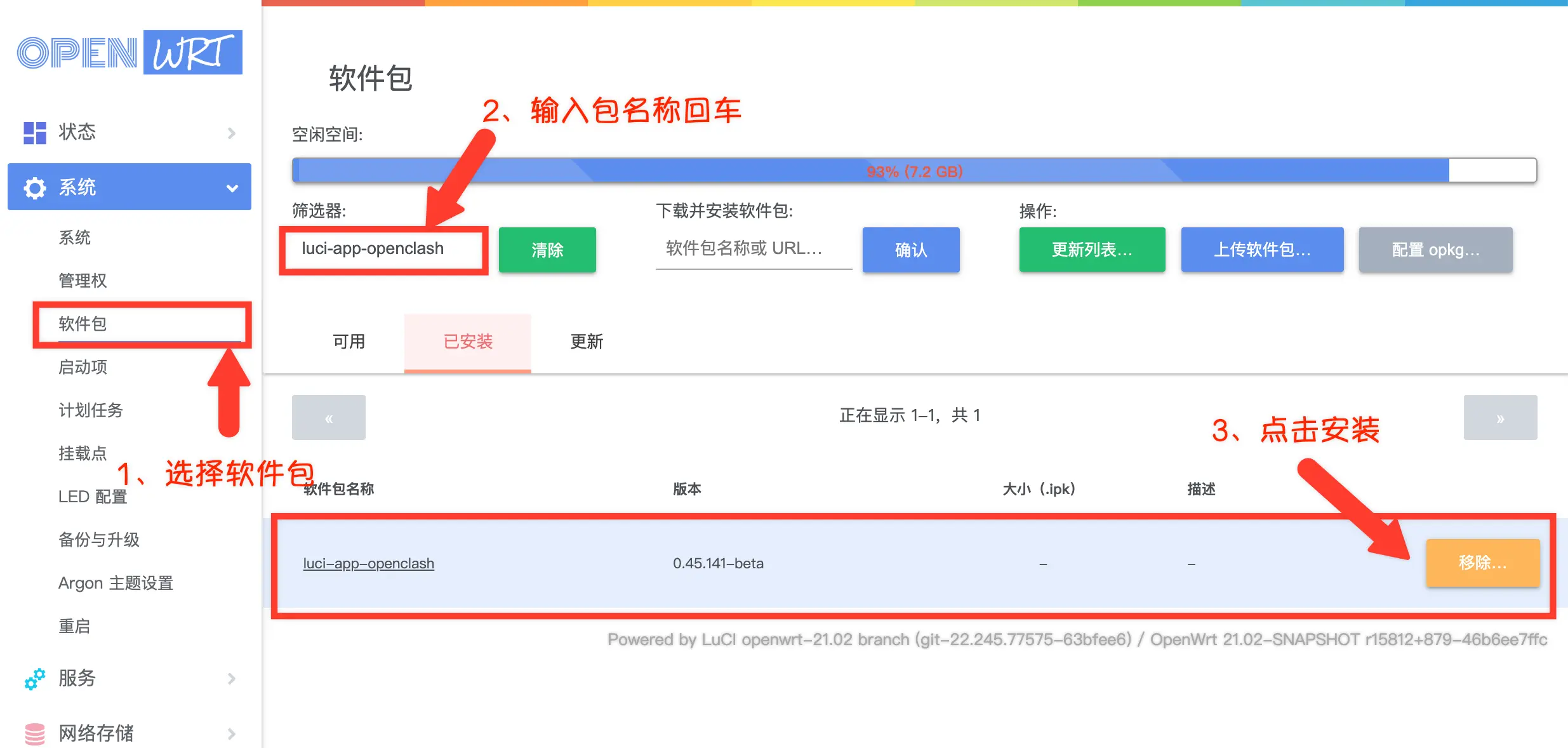
From the command line: upload the package to the router's /tmp directory and run:
opkg install /tmp/luci-app-openclash_*_all.ipk
apk add -q --force-overwrite --clean-protected --allow-untrusted /tmp/luci-app-openclash-*.apk
Setup
Get your subscription link
OpenClash is only a proxy tool and does not include any servers. Sign in to your provider's dashboard and copy your subscription link.
Add the subscription
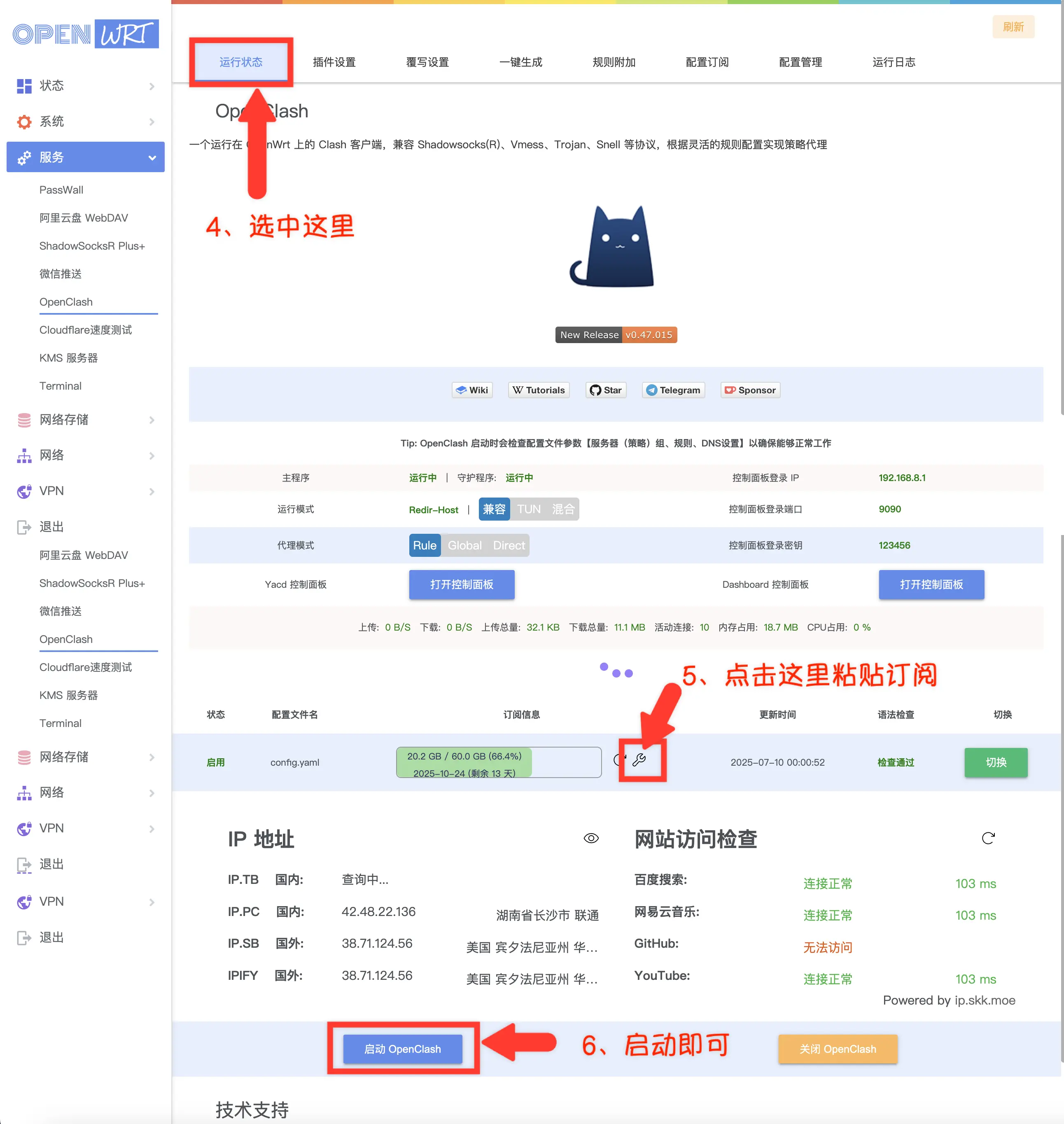
Open Services → OpenClash, go to Config Subscribe, click Add, enter a name and the subscription URL, save, and then click Update Config to download it.
Start OpenClash
Go back to the Running Status page, make sure the config file is enabled, and click Start OpenClash at the bottom. The first start downloads the core automatically, so the router needs to reach GitHub. Give it a moment.
Verify
Once it starts, the Running Status page shows each service as running. Open your usual websites on a phone or computer connected to the router. If they load, you're done.
FAQ
dnsmasq-full and the firewall packages. See Troubleshooting for more.